Home Lab
Storage
A dedicated UNAS Pro storage layer with six drives providing approximately 40 TB of usable capacity after RAID 5, shared NFS/SMB access, and separation from the compute platform.
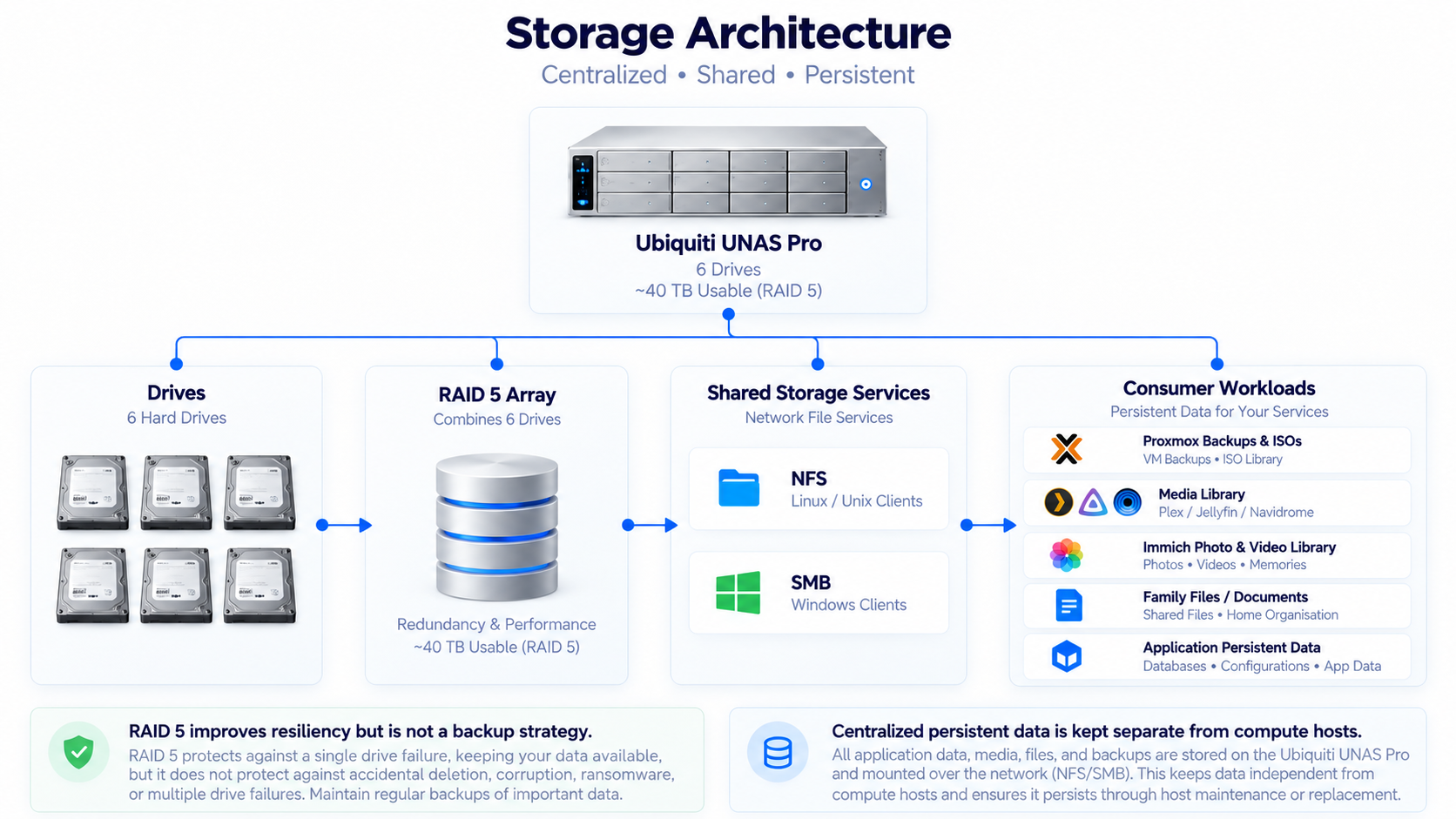
Storage Architecture
Platform
UNAS Pro
Capacity
6 Drives / ~40 TB
Usable capacity after RAID 5
Protection
RAID 5
Single-drive fault tolerance
Storage Architecture+
The storage layer is centered around a Ubiquiti UNAS Pro, which provides centralized network-attached storage for the home lab.
The goal was to avoid tightly coupling important application data to individual Proxmox hosts.
Instead of every compute node owning all of its own data locally, storage is treated as a separate infrastructure layer connected to the compute environment through the network.
This creates a cleaner separation between compute, networking, storage, and applications and makes the environment easier to maintain and evolve.
Physical Storage & RAID+
The UNAS Pro is populated with six physical drives providing approximately 40 TB of usable storage capacity after RAID 5.
The disks are configured in RAID 5, which stripes data across the drives while maintaining distributed parity.
The RAID 5 design allows the array to tolerate the failure of a single drive without immediately losing the entire storage pool.
The choice balances usable capacity, redundancy, and cost more effectively for this environment than mirroring every disk.
RAID 5 is not treated as a backup strategy. RAID protects primarily against a single physical disk failure; it does not protect against accidental deletion, corruption, ransomware, administrative mistakes, catastrophic NAS failure, fire, theft, or other site-level events.
Backup therefore remains a separate architectural concern from disk redundancy.
Why Centralized Storage+
A simpler design would store everything directly on the local disks inside each Proxmox node.
That approach works, but it creates a strong dependency between a workload and the physical host where its data resides.
Centralized storage reduces that dependency by allowing application data, media, shared files, and selected virtualization workloads to remain independent from the lifecycle of a particular compute node.
This provides more flexibility for maintenance, host replacement, workload migration, backup, and recovery.
Why UNAS Pro+
The UNAS Pro was selected because it fits naturally into the existing UniFi-based infrastructure while providing dedicated storage independent from the Proxmox compute cluster.
It provides a purpose-built storage platform rather than forcing one of the Proxmox nodes to perform double duty as both compute and storage.
The storage system's primary responsibility is to provide reliable shared storage to the rest of the environment rather than becoming another general-purpose application host.
The seven-bay platform also leaves room for future storage expansion beyond the six drives currently installed.
Why Not Use Proxmox as the NAS+
It would have been possible to install additional disks inside a compute server and expose that storage through NFS or SMB.
That would reduce hardware cost, but it would also combine virtualization and storage responsibilities inside one physical failure domain.
A single host could then be responsible for running virtual machines, containers, shared storage, application data, and potentially backups.
Separating storage from compute reduces that concentration of responsibilities and gives storage its own lifecycle, monitoring, capacity-planning, and maintenance model.
Why Not Synology or QNAP+
Synology and QNAP would both have been valid alternatives and provide mature NAS platforms with strong ecosystems and broad protocol support.
The UNAS Pro fit this environment because the network was already heavily based around UniFi and the requirement was focused storage rather than another application-hosting platform.
The decision was based on architectural fit rather than a claim that the UNAS Pro is universally superior to those platforms.
10GbE Storage Connectivity+
Shared storage can generate significant internal network traffic, particularly when virtual machines, backups, media workloads, and multiple applications access the storage platform simultaneously.
The 10GbE infrastructure backbone helps prevent the network from becoming the primary bottleneck between compute and storage.
This becomes especially important for virtual-machine workloads, large file transfers, backup and restore operations, and other high-volume east-west traffic.
The goal is not simply higher peak throughput, but a storage path with enough capacity to support multiple infrastructure workloads concurrently.
NFS+
NFS is used where Linux and virtualization workloads require shared storage.
It integrates naturally with Proxmox and Linux-based systems and allows remote storage to be mounted and consumed much like a local filesystem.
NFS supports virtual-machine related storage, application data, media, backups, shared Linux files, and other infrastructure requirements.
Its primary architectural benefit is that the data does not have to remain permanently attached to a specific compute node.
SMB+
SMB is used where broader workstation and file-sharing compatibility is required.
It provides convenient access from macOS and Windows systems and is useful for shared documents, media management, general file access, and other user-facing storage requirements.
Using both NFS and SMB allows the storage platform to support different access patterns without requiring every workload to use the same protocol.
Shared VM Storage+
Shared storage provides Proxmox with access to data that does not live solely on a single compute node.
This becomes increasingly important as the cluster matures because it supports more flexible maintenance, centralized backup, workload movement, and future high-availability designs.
Shared storage is one of the foundational dependencies that must be considered before Proxmox HA can be treated as a reliable recovery mechanism.
Application Storage+
Many self-hosted applications require persistent data even when the application container or virtual machine itself can be rebuilt quickly.
This creates an important distinction between replaceable application runtime and critical application data.
The storage architecture therefore focuses on preserving the data and state that services depend on rather than assuming the VM or container instance itself is the most important asset.
Media Storage+
Plex and Jellyfin benefit significantly from centralized media storage.
Media files remain independent from the virtual machines or containers running the applications.
The media library can therefore survive VM replacement, application upgrades, host migration, or compute-node failure without requiring the media collection to move with the application server.
Centralized media storage also allows multiple services to consume the same underlying content where appropriate.
Backup Storage+
Backups are another major responsibility of the storage platform, but backup data is treated differently from ordinary production application data.
The goal is to increasingly separate production workloads from the systems and repositories used to recover them.
A production workload should not automatically have unrestricted ability to delete, alter, or encrypt all of its own recovery points.
This is why backup architecture is treated as both a storage problem and a security problem.
Backup VLAN Integration+
Backup infrastructure is assigned its own logical network segment through the Backup Homelab VLAN.
This creates a foundation for restricting which systems can communicate with backup resources and how those resources can be accessed.
Over time, the design can support tighter write permissions, separate credentials, controlled restore workflows, reduced lateral movement, and stronger ransomware-resilience controls.
Persistent Mounts+
One practical lesson was the importance of persistent network mounts.
A storage share that works when mounted manually is not sufficient if applications depend on that storage after a reboot, service restart, or host maintenance event.
Persistent mount configuration therefore became part of the infrastructure design so that workloads can reliably regain access to their dependencies without manual intervention.
This reinforced a broader principle: a dependency that works only when manually restored is not yet automated infrastructure.
Plex Capacity Issue+
The Plex environment provided a useful example of how storage and compute problems can appear as application problems.
The Plex virtual machine filesystem reached 100% utilization.
The application was still present, but the underlying filesystem no longer had sufficient free capacity for normal operation.
The virtual disk was expanded, the filesystem was extended, and Plex data consumption was reviewed.
This reinforced the importance of monitoring storage utilization independently from application availability.
Capacity Planning+
Storage requires continuous capacity planning because data tends to grow rather than remain static.
The environment must account for media growth, virtual-machine data, application data, backups, snapshots, logs, database growth, and future projects.
The important question is therefore not only how much free space exists today, but how quickly capacity is being consumed and when expansion will be required.
This is an area where storage, monitoring, and observability increasingly intersect.
Performance vs Capacity+
Storage design has to balance capacity and performance because different workloads have very different I/O characteristics.
Media storage may prioritize large amounts of capacity, virtual-machine storage may be more sensitive to latency and I/O performance, and backup storage may prioritize durability and retention.
As the environment grows, these differing requirements may justify multiple storage tiers instead of treating every workload as though it needs the same type of storage.
Storage Security+
Storage contains some of the most valuable data in the environment, so access is intentionally controlled.
Guest and IoT networks should not have unrestricted access to storage, management interfaces remain private, and externally exposed workloads should not automatically gain broad storage privileges.
The long-term model is based on limiting which VLANs, hosts, users, and services can reach specific storage resources.
Being connected to the network should never automatically imply access to shared storage.
Storage & High Availability+
Storage will become increasingly important as the planned Proxmox High Availability project is implemented.
Automatically restarting a virtual machine on another node provides little value if the surviving node cannot reach the workload's storage, network shares, databases, or other persistent dependencies.
High availability is therefore not purely a compute problem. It depends on compute, network, storage, and application dependencies all remaining available.
Future HA testing will need to confirm not only that a workload restarts, but that its storage dependencies return correctly and the service becomes operational without manual intervention.
Current Limitations+
The current storage environment is suitable for the existing lab, but it is not treated as the final architecture.
Future areas of improvement include stronger backup isolation, formal retention policies, off-site backup, restore testing, expanded storage monitoring, performance baselines, capacity forecasting, and potentially separate storage tiers.
The goal is to continue maturing the platform around recovery and operational resilience rather than simply adding more raw capacity.
Lessons Learned+
The storage platform has reinforced that data should not be unnecessarily tied to compute hardware.
Shared storage increases flexibility but also introduces new dependencies on networking, mount configuration, permissions, and storage availability.
Storage performance and storage capacity are separate design concerns.
RAID provides disk-failure protection but does not replace backup.
Persistent mounts must survive reboots and maintenance.
Application failures can actually be storage or filesystem failures.
Backup infrastructure requires its own security model.
Network performance directly affects shared-storage performance.
High availability depends on storage availability just as much as it depends on multiple compute nodes.