Home Lab
Network
A segmented, redundant, high-speed network architecture built around UniFi, 10GbE SFP+ connectivity, controlled trust zones, centralized DNS, secure remote access, and protected application delivery.
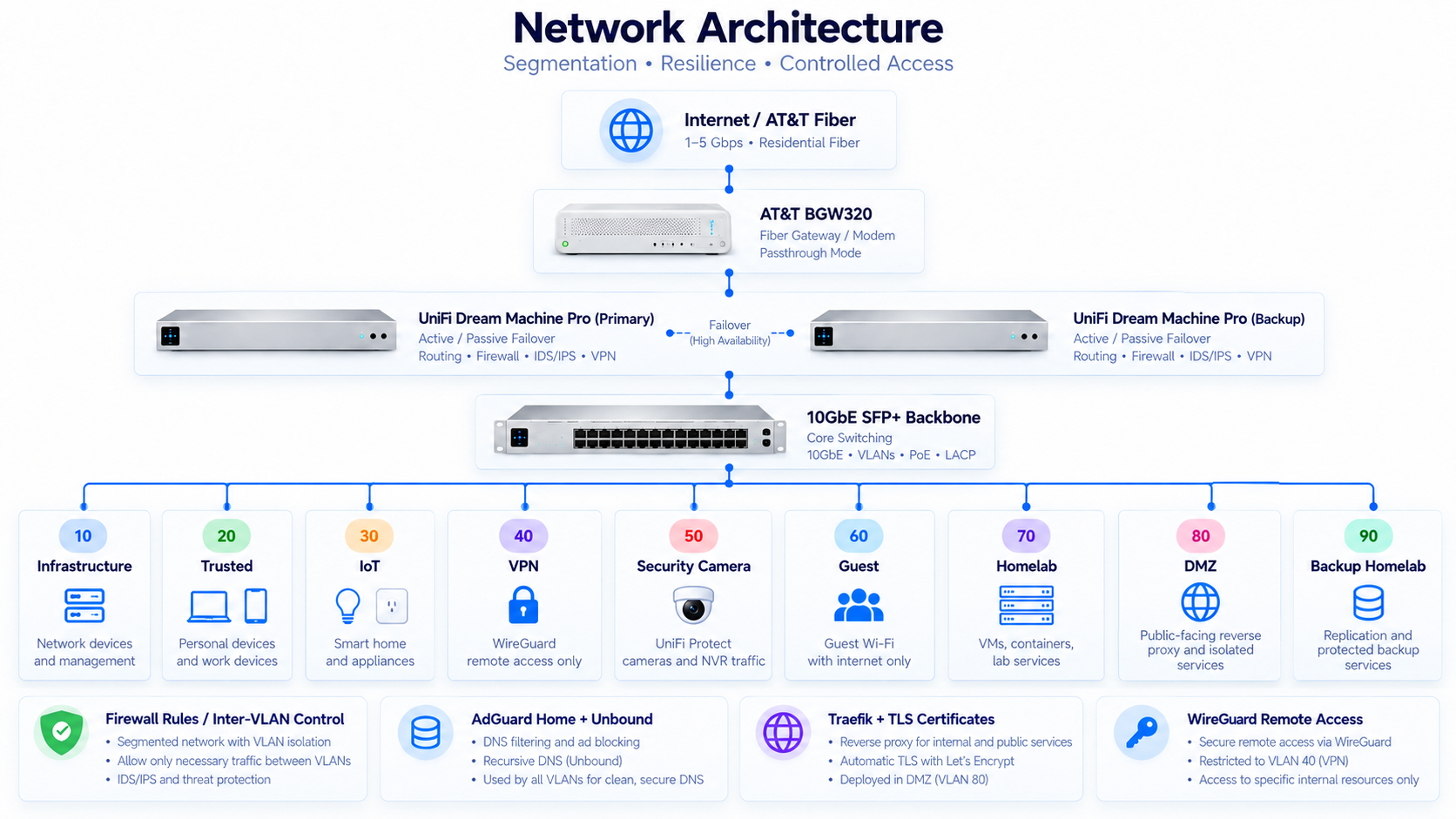
Core Architecture
AT&T Fiber
↓
AT&T BGW320
↓
UDM Pro Active / Passive Gateway Pair
↓
10GbE SFP+ Backbone
↓
Managed UniFi Switching
↓
Proxmox • UNAS Pro • Wireless • Cameras • IoT • Trusted Clients
Network Architecture+
The home lab network was designed around enterprise networking principles rather than a traditional flat residential LAN.
The architecture emphasizes redundancy, segmentation, centralized management, high-speed east-west connectivity, controlled inter-VLAN access, and secure remote connectivity.
Internet connectivity enters through AT&T Fiber and the BGW320 gateway. Behind the provider edge sits a redundant pair of UniFi Dream Machine Pro gateways configured in an active/passive failover design.
The active UDM Pro provides primary routing, firewall enforcement, VLAN management, VPN services, IDS/IPS, and internet gateway functionality. The secondary UDM Pro serves as the standby gateway, reducing the risk of the network edge becoming a single point of failure.
From the gateway layer, the network transitions into a managed UniFi switching environment connected through a 10GbE SFP+ backbone.
The objective was not simply to provide internet connectivity throughout the house. The network was intentionally designed to operate more like a small enterprise infrastructure environment, where workloads are segmented by role and trust level and communication between those zones is explicitly controlled.
High Availability & Gateway Redundancy+
Two UniFi Dream Machine Pro gateways are used instead of relying on a single edge appliance.
One UDM Pro operates as the active gateway while the secondary device provides passive failover capability.
This reduces the gateway layer as a single point of failure for internet access, routing, inter-VLAN communication, firewall enforcement, VPN services, and IDS/IPS.
The design also provides practical experience with active/passive architecture, gateway failover, failure-domain reduction, and infrastructure resilience.
AT&T Fiber & Internet Edge+
The ISP edge is provided by AT&T Fiber through the BGW320 gateway.
The BGW320 remains part of the AT&T service architecture, but it is not intended to function as the primary network controller.
The internal architecture places routing, VLAN management, firewall policy, VPN access, and security enforcement within the UniFi gateway layer.
The design avoids unnecessary duplication of routing and NAT responsibilities while maintaining compatibility with the AT&T service architecture.
10GbE SFP+ Backbone+
The core infrastructure backbone is designed around 10 Gigabit Ethernet using SFP+ connectivity.
This supports high-bandwidth east-west traffic between compute, switching, storage, and other infrastructure systems.
Workloads such as virtual machine traffic, storage access, backups, media processing, application communication, and large file transfers can generate substantially more internal traffic than typical residential systems.
The primary benefit of 10GbE is therefore not internet speed. It is removing bottlenecks between internal infrastructure components.
Managed UniFi Switching+
Managed UniFi switching forms the distribution layer beneath the gateway pair.
The switching environment supports VLAN trunking, tagged traffic, access-port assignment, PoE connectivity, server connectivity, wireless access points, cameras, storage, infrastructure devices, and client systems.
Managed switching allows many logically isolated networks to share the same physical switching infrastructure.
Why UniFi+
UniFi was selected because it provides a strong balance between enterprise-style networking capabilities and practical administration for a home lab.
Routing, switching, wireless, VLANs, firewall policy, IDS/IPS, VPN connectivity, cameras, client visibility, and topology can be managed through a common ecosystem.
Traditional enterprise platforms can provide deeper capabilities, but often introduce substantially greater cost, licensing requirements, administrative overhead, and operational complexity.
The objective was to implement enterprise networking concepts without turning network administration itself into the entire purpose of the lab.
VLAN Architecture+
The network is segmented according to device function, workload type, and trust level.
VLAN 10 is dedicated to Infrastructure.
VLAN 20 contains Trusted endpoints.
VLAN 30 contains IoT devices.
VLAN 40 is dedicated to VPN clients.
VLAN 50 isolates Security Cameras.
VLAN 60 provides Guest connectivity.
VLAN 70 contains Homelab workloads.
VLAN 80 provides the DMZ.
VLAN 90 is dedicated to Backup Homelab infrastructure.
The segmentation model allows network policy to be based on what a system is and what it needs rather than simply trusting every internally connected device.
Firewall & Inter-VLAN Security+
Firewall policy controls communication not only between the internet and the environment, but also between internal trust zones.
Traffic between IoT, Infrastructure, Guest, Trusted, Camera, VPN, Homelab, DMZ, and Backup networks is not assumed to be trusted.
The long-term model follows a simplified least-privilege approach: systems should be allowed to communicate with the services they require while unnecessary communication remains blocked.
DNS Architecture & Enforcement+
DNS is provided through AdGuard Home and Unbound rather than relying solely on the network gateway or an external resolver.
AdGuard Home provides DNS filtering, client visibility, local naming, DNS rewrites, and policy capabilities.
Unbound provides recursive DNS resolution behind AdGuard Home.
Client devices are not allowed to bypass the local DNS architecture. Network policy forces clients to use the approved DNS path rather than allowing arbitrary external DNS resolvers.
This gives DNS policy a consistent enforcement point across the segmented environment and prevents a client from avoiding filtering simply by manually selecting another resolver.
The design separates DNS policy from recursive resolution while keeping DNS behavior centrally controlled across the VLAN architecture.
WireGuard Remote Access+
WireGuard provides the secure remote-access path into the home lab when connectivity is required from outside the local network.
The VPN is intentionally designed so that a remotely connected device does not become equivalent to a device physically attached to the Trusted LAN.
Every WireGuard client is placed into VLAN 40, which is dedicated specifically to VPN traffic.
This keeps remotely connected systems logically separated from the Trusted, Infrastructure, IoT, Homelab, Security Camera, Guest, DMZ, and Backup networks.
The UniFi firewall layer then determines what a VPN client is allowed to access after the encrypted tunnel has been established.
WireGuard therefore handles secure entry into the environment while VLAN segmentation and firewall policy govern movement after entry.
A VPN client may be allowed to reach selected applications or management services without receiving unrestricted lateral access throughout the environment.
This also provides a containment boundary if a remote endpoint becomes lost, compromised, or otherwise untrusted.
WireGuard was originally tested within an unprivileged LXC container, but networking and kernel capability restrictions made that deployment model unnecessarily difficult.
Rather than weakening the container security model, WireGuard was moved to a dedicated Debian virtual machine.
The VM consumes slightly more resources but provides cleaner isolation, predictable networking behavior, and easier troubleshooting.
The experience reinforced an important design principle: the deployment option with the lowest resource consumption is not automatically the best operational design.
Traefik & Application Routing+
As the number of self-hosted applications increased, accessing services through raw IP addresses and port numbers became difficult to manage.
Traefik was introduced as the reverse-proxy and application-routing layer.
Applications can be presented through consistent internal DNS names while Traefik routes requests to workloads running across different hosts and network segments.
This separates internal application ports from user-facing service endpoints and creates a cleaner service-delivery model.
SSL / TLS & Certificate Management+
SSL/TLS is used to protect web-based access to internal applications and to avoid relying on unencrypted HTTP for services that handle credentials, administrative access, or sensitive application data.
Traefik acts as the reverse-proxy layer and provides a natural point for TLS termination. Users connect to a service over HTTPS, Traefik presents the appropriate certificate, and then routes the request to the correct internal application.
This allows internal applications to be accessed through stable DNS names and standard HTTPS endpoints rather than through raw IP addresses and nonstandard ports.
Certificate management is treated as part of application delivery rather than as an application-by-application afterthought. The goal is to centralize certificate handling where practical so that services can use a consistent and repeatable HTTPS model.
Internal DNS, Traefik routing, firewall policy, and TLS configuration must all agree for a service to work correctly. A valid certificate alone does not solve routing or access-control problems, and a correctly routed service should still not be exposed without appropriate encryption where sensitive traffic is involved.
The architecture also separates public documentation from operational certificate details. Private keys, certificate secrets, API credentials, and other sensitive material are never stored in public repositories.
The broader design goal is to make HTTPS the normal access pattern for internal web applications while keeping certificate renewal and management as automated and centralized as practical.
Challenges & Lessons Learned+
Building the network involved significantly more than purchasing network equipment and defining VLANs.
Challenges included integrating the AT&T gateway, avoiding unnecessary double NAT, implementing gateway redundancy, building the 10GbE backbone, creating firewall boundaries without breaking application traffic, managing DNS across segmented networks, deploying WireGuard, configuring reverse-proxy routing, and introducing TLS across internal web services.
The continuing challenge is balancing usability with security while resisting the temptation to solve application problems by simply removing network restrictions.