Home Lab
Apple HomeKit
An Apple-centric smart home environment integrating HomeKit, Home Assistant, Homebridge, Scrypted, Zigbee2MQTT, Mosquitto, connected devices, and real-world automations designed to make daily life simpler and safer.
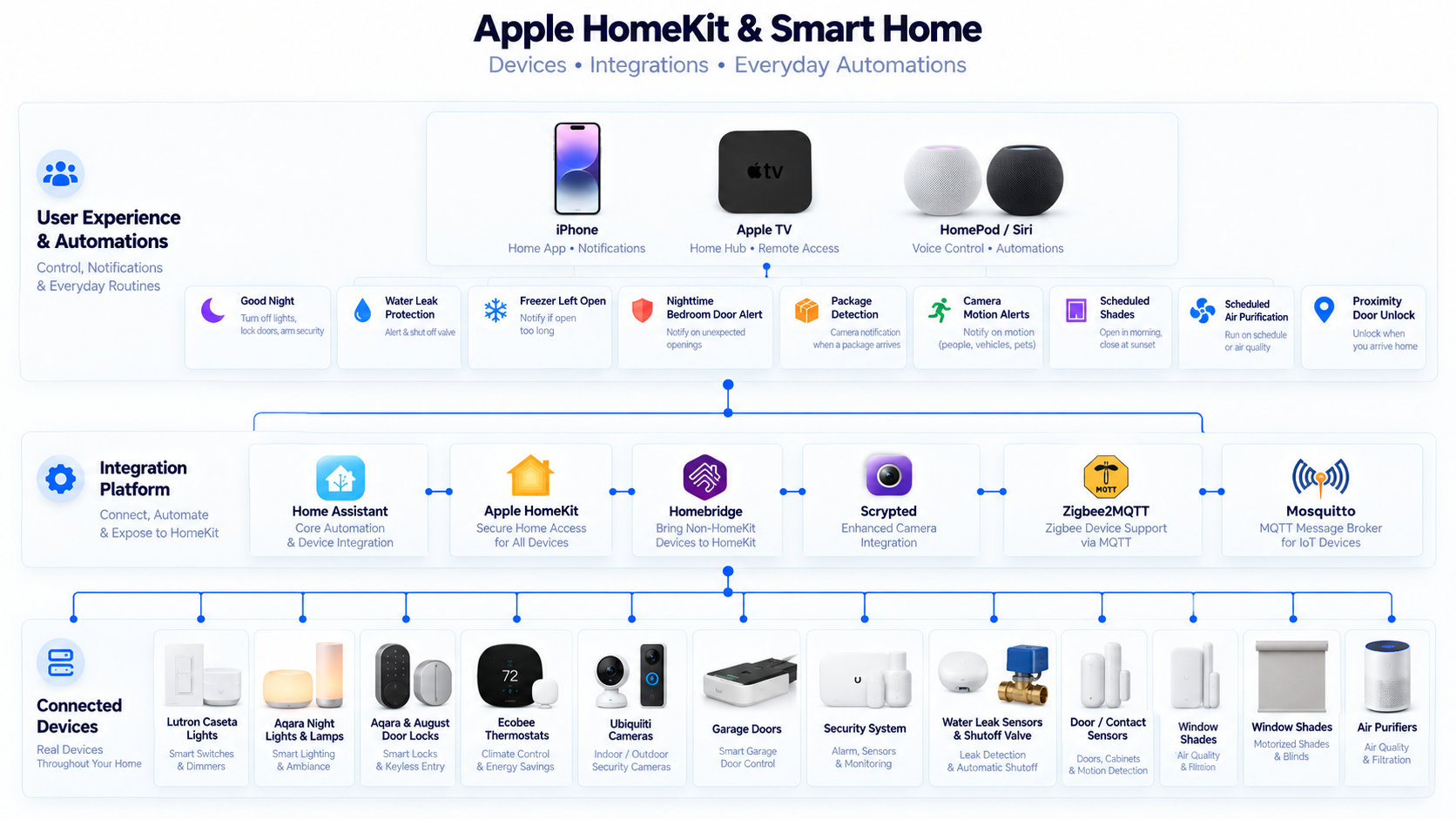
Smart Home Architecture+
The smart-home environment is built as a layered architecture rather than requiring every device to work natively with one platform.
Apple HomeKit provides the primary user-facing experience, while Home Assistant provides broader integration, automation, and infrastructure-level control behind the scenes.
Homebridge, Scrypted, Zigbee2MQTT, and Mosquitto extend compatibility and allow devices from different ecosystems to participate in a common smart-home environment.
This approach keeps the user experience simple while allowing the underlying system to remain flexible and more vendor-independent.
Connected HomeKit Devices+
The Apple Home environment brings together devices from multiple manufacturers into one user-facing control and automation layer.
Rather than requiring every device to come from a single vendor, Home Assistant, Homebridge, Scrypted, and native HomeKit integrations allow the environment to combine different ecosystems while presenting them consistently through Apple Home.
Lighting — Lutron Caseta smart switches provide control of primary household lighting through HomeKit.
Night Lights — Aqara-connected night lights provide automated low-level hallway and nighttime lighting.
Door Locks — Aqara and August smart locks provide HomeKit-connected door access, remote status, automation, and proximity-based locking and unlocking.
Thermostats — Ecobee thermostats provide climate control and temperature management through Apple Home.
Security Cameras — Ubiquiti cameras are integrated into the Apple ecosystem through the smart-home infrastructure, allowing camera events and video to surface on Apple devices.
Lamps — Aqara-connected devices provide HomeKit control of lamps and accent lighting.
Garage Doors — Garage-door status and control are incorporated into HomeKit automations, including the Good Night routine that verifies and closes the garage doors.
Security System — The home alarm system participates in HomeKit automation so security can be armed as part of household routines.
Water Leak Sensors & Shutoff Valve — Water sensors monitor for leaks and can trigger the home's automated water shutoff valve.
Door & Contact Sensors — Contact sensors are used for safety and awareness automations, including bedroom-door and freezer-door monitoring.
Window Shades — Motorized shades are integrated into scheduled HomeKit routines for automatic opening and closing.
Air Purifiers — Connected air purifiers are controlled through scheduled smart-home routines.
Apple TV and Apple devices also act as important presentation and notification endpoints, allowing camera events, alerts, and smart-home status to surface where the family is already interacting with the Apple ecosystem.
Apple HomeKit+
Apple HomeKit provides the primary Apple-facing control layer for supported smart-home devices and automations.
It allows devices and scenes to be accessed through the Apple Home experience across supported Apple devices.
The HomeKit layer is intentionally treated as the user interface rather than requiring it to perform every integration and automation function by itself.
Home Assistant+
Home Assistant serves as the central integration and automation platform.
It provides support for devices and services that may not be natively supported by Apple HomeKit and allows more complex automations, conditions, integrations, and device relationships.
Selected entities can be exposed into HomeKit so the Apple-facing experience remains simple while Home Assistant performs the deeper orchestration work.
Home Assistant also creates a bridge between smart-home automation and the broader home-lab environment.
Homebridge+
Homebridge extends HomeKit compatibility to selected devices and services that do not provide native Apple Home integration.
This allows existing devices to participate in the Apple Home environment without requiring every device to be replaced with hardware from a single ecosystem.
Homebridge therefore acts as a compatibility layer rather than the primary automation engine.
Scrypted+
Scrypted is used primarily for camera and video integration.
It bridges supported camera systems into the Apple smart-home environment and allows camera capabilities to be consumed through Apple Home.
This keeps the camera platform integrated with the broader security architecture while still providing a convenient Apple-facing experience.
Zigbee2MQTT+
Zigbee2MQTT provides an integration layer for Zigbee-based smart-home devices.
It translates Zigbee device communication into MQTT messages that can be consumed by Home Assistant and other supporting services.
This reduces dependence on separate vendor-specific cloud hubs and provides greater local control over supported Zigbee devices.
Mosquitto MQTT+
Mosquitto provides the MQTT messaging broker used by Zigbee2MQTT and other event-driven integrations.
MQTT provides a lightweight publish-and-subscribe communication model that allows devices and services to exchange state and event information without requiring tightly coupled point-to-point integrations.
This makes the messaging layer reusable across multiple smart-home workflows.
Camera Integration+
The camera environment is kept on a dedicated Security Camera VLAN rather than sharing the same trust zone as general-purpose user devices.
Scrypted and supporting services provide controlled integration between the camera environment and Apple HomeKit.
This allows camera functionality to be exposed where needed without making the camera network broadly accessible to the rest of the environment.
IoT Network Segmentation+
Smart-home and IoT devices operate inside the broader VLAN and firewall architecture rather than being placed on a single unrestricted home network.
IoT devices are isolated from trusted endpoints and infrastructure services unless a specific communication path is required.
Home Assistant and bridge services can therefore communicate with smart-home devices through controlled network rules while unnecessary lateral access remains restricted.
The design recognizes that convenience devices should not automatically receive the same level of trust as laptops, infrastructure systems, or administrative endpoints.
Automation for Everyday Life+
The most useful automations in the house are not designed simply to demonstrate smart-home technology. They are intended to remove small daily tasks, improve safety, and reduce the number of things the family has to remember.
Good Night — Saying “Hey Siri, good night” starts a coordinated nighttime routine. The doors lock, garage doors close, the alarm is armed, most of the house lights turn off, bedroom lighting remains available, and night lights illuminate the hallways.
Water Leak Protection — If a water leak is detected, the household is notified and the automated water valve shuts off the home's water supply. The goal is to move beyond simply detecting a leak and automatically take action to limit potential damage.
Freezer Left Open — If a freezer remains open for more than five minutes, lights throughout the house cycle on and off. The highly visible alert makes it difficult for someone to miss the warning even if a phone notification is ignored.
Nighttime Bedroom Door Alert — If my daughter's bedroom door opens after 11 PM, the lamps in our bedroom cycle on and off three times in green. This provides an immediate visual warning if she gets out of bed late at night, including situations where she may be sleepwalking.
Package Detection — When a package is detected at the front door, an audible notification is played inside the house so the family knows a delivery has arrived without needing to check a phone.
Camera Motion Alerts — Cameras covering the doors, yards, and driveways generate motion alerts and video clips. Notifications can appear on phones and Apple TV, making the security system visible across the Apple ecosystem.
Automated Window Shades — Window shades automatically open and close according to schedule, eliminating another repetitive daily household task.
Scheduled Air Purification — Air purifiers automatically turn on and off according to schedule so air-quality devices operate without requiring manual control each day.
Proximity-Based Door Access — Supported smart locks can automatically lock or unlock based on proximity and credentials stored in Apple Wallet, reducing the need to carry or manually use a physical key.
Automation Strategy+
Simple user-facing routines and scenes can remain within Apple Home where that provides the easiest experience.
Home Assistant is used where automations require multiple conditions, cross-platform integrations, more complex logic, or deeper interaction with supporting services.
The goal is to use the simplest platform capable of reliably implementing a particular automation rather than forcing every workflow into one tool.
Local Control & Resilience+
A major design goal is to keep as much smart-home functionality local as practical.
Local platforms such as Home Assistant, Homebridge, Zigbee2MQTT, Mosquitto, and Scrypted reduce unnecessary dependence on vendor cloud services for core integrations.
Local control also improves the ability to troubleshoot dependencies and integrate smart-home behavior with the rest of the home-lab infrastructure.
HomeKit Design Philosophy+
The user experience should remain straightforward even if the infrastructure behind it is sophisticated.
Apple HomeKit provides the polished user-facing control layer, while Home Assistant and supporting services provide deeper compatibility, automation, messaging, and integration.
The result is a layered smart-home architecture that prioritizes usability without abandoning segmentation, local control, and infrastructure security.